

How to
Pixel-art sprites
One game sprite as real pixel art, on a true grid with hard edges and a small palette. Sprite sheets and tiny sprites stay in code.
When to use it
One character, enemy or item for a game, about 60 to 120 px tall, with more detail than you'd place by hand.
Have your agent draw these in code instead:
- Sprites under about 48 px. At that size every pixel is a decision, and code places them exactly.
- Sprite sheets and walk cycles. An image model can't plan frames in one picture. In our test it returned near-identical poses; code drew a cycle that loops in the engine.
- Pixel-art tiles. They repeat by construction in code.
In our side-by-side test, before the pixel step existed, Claude Code's own 32 px knight beat the model's render as a game asset: the render looked like pixel art but sat on no grid (how we tested). The steps below are what we added for that.
What to ask your agent
Make an idle sprite of our hero: a tiny knight with a round steel helmet and a mossy green cloak, small sword at the hip, side view facing right.
What your agent sends
Claude Code calls vvgen_generate_asset with the pixel-sprite preset:
{
  "preset": "pixel-sprite",
  "subject": "a tiny knight standing in an idle pose, round steel helmet with a dark visor slit, a mossy green hooded cloak over the shoulders, small sword at the hip, side view facing right"
}
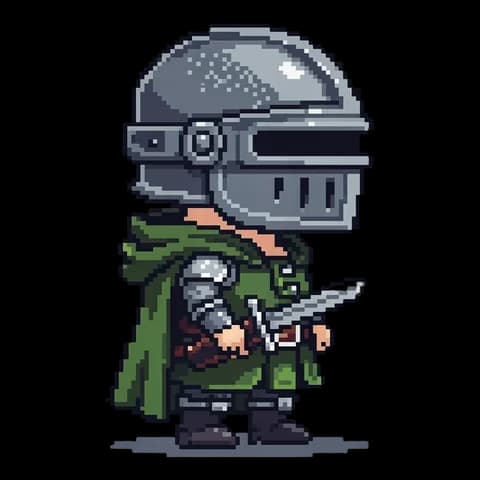
The preset asks the model for chunky square pixels on flat magenta, then runs free steps on the result: it keys out the
magenta, finds the render's own pixel grid and snaps to it (one flat colour per pixel, at most 24 colours, alpha only
0 or 255), crops, and exports 2x, 4x and 8x copies scaled nearest-neighbour. params takes grid (a target height in
pixels) and colors.
What comes back
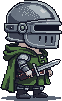
A 1x master sized to the art's own grid, the scaled exports, a preview and the free checks: the colour count and whether any soft edge pixels are left. The pair above shows what the snap does. Our test asked for a white background and a cut-out rather than the preset's magenta, and the snap ran on that file on 15 October, so the preset's own output will differ.
Ask your agent to look at the 4x export, and to pass grid when the sprite must match a fixed height in your game.
In Cursor and Codex
Same tool, same arguments: see the Cursor and Codex quickstarts.
What it costs
| One sprite | 6 credits ($0.06) |
|---|---|
| Keying, grid snap, palette check and 2x/4x/8x exports | 0 credits |
From the price card. Your agent gets a quote before each call. Failed results and cache hits cost nothing.
Add it to Claude
One connector for Claude on the web, desktop and mobile, and for Claude Code when it's signed in with your Claude account. Cursor, Codex, Windsurf and other MCP clients are in the quickstarts.
In Claude Code, without a key
claude mcp add -s user --transport http \
  vincevangen https://api.vincevangen.com/mcp
Then run /mcp in Claude Code to sign in.