How to
Product shots
A studio photo of your product for a shop page, a landing page or an ad, from one request to your agent.
When to use it
A product shown as a studio photograph: a coffee bag, a bottle, a pair of headphones. Your agent can draw a packaging mockup in code, but it won't read as a photo. In our side-by-side test of 14 asset jobs, the product photo was one of the jobs vincevangen won outright, and a blind judge agreed (how we tested).
Leave the label blank. Image models paint fake lettering on packaging, and your real artwork goes on afterwards.
What to ask your agent
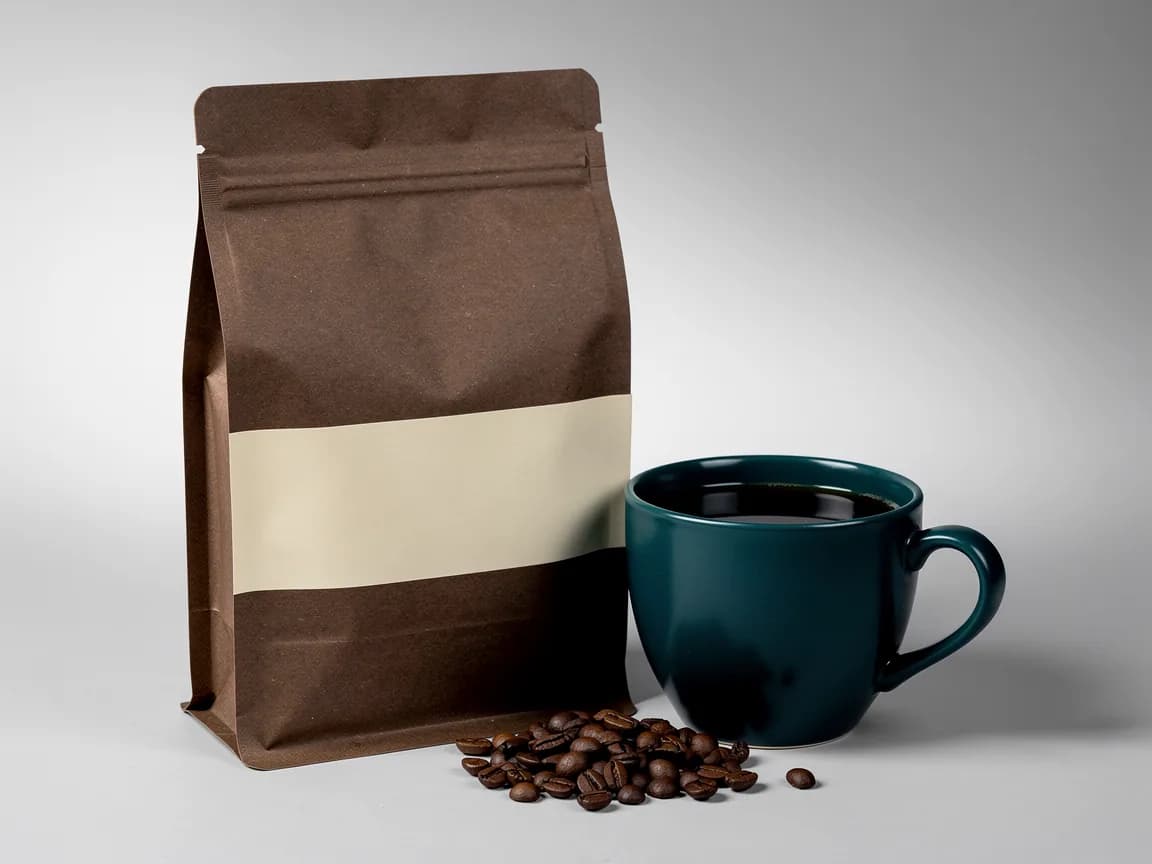
Make a product shot for the shop page: our coffee bag, matte espresso brown with a plain crema label band, standing next to a teal cup of black coffee, a few beans in front. Then cut it out for the shop page.
What your agent sends
Claude Code calls vvgen_generate_asset with the product-shot preset. This
is the call from our test, word for word:
{
  "preset": "product-shot",
  "subject": "a matte espresso-brown #3B2418 kraft coffee bag with a plain crema #E9C79A label band, standing upright, next to a deep teal #0F4C4A ceramic cup of black coffee, a few whole roasted beans in front",
  "seed": 11
}
The preset adds the studio set: a three-quarter angle on a seamless light-grey sweep, softbox light and a soft contact
shadow. Pass lighting to change the light, for example "warm late-afternoon sun from the right". Name colours as
hex codes in the subject when they matter.
One call, one final: a brief this complete needs no drafts. For a transparent PNG the agent then calls
vvgen_remove_background on the result's id.
To see options first, say so. The agent drafts four on the cheapest tier ("model": "fast", "n": 4), looks at the
contact sheet, and finishes the one you like with vvgen_generate_image and "from_draft": "<its id>": an edit of
that draft on the Final tier, so the result is the same picture. The finish costs more than a plain final, so this
path pays off when you would otherwise want two or more finished shots.
What comes back
The file lands in your repo (or downloads by id), with one small preview for the agent to look at, the credits the call cost, the model and its licence. The preset now delivers 1600 × 1200; the image above was made before that size fix, at the model's own 1152 × 864.
Ask your agent to look at the preview before it moves on: fake text on the label, the product's proportions, a cup handle that melts into the bag.
In Cursor and Codex
Same tools, same arguments. Add the server with the Cursor or
Codex quickstart. Codex also has its own $imagegen image tool. For a one-off image that is
fine, and vvgen_import brings its file in for size exports, exact text and a provenance
record at no charge.
What it costs
| One final, as above | 6 credits ($0.06) |
|---|---|
| One final, then a cut-out | 10 credits ($0.10) |
| Four options first, the pick finished, then a cut-out | 15 credits ($0.15) |
From the price card. Your agent gets a quote before each call. Failed results and cache hits cost nothing.
Add it to Claude
One connector for Claude on the web, desktop and mobile, and for Claude Code when it's signed in with your Claude account. Cursor, Codex, Windsurf and other MCP clients are in the quickstarts.
In Claude Code, without a key
claude mcp add -s user --transport http \
  vincevangen https://api.vincevangen.com/mcp
Then run /mcp in Claude Code to sign in.